重要提示:操作前必读
- 设备访问: 通常通过Console口(控制台)首次连接进行初始配置,之后也可以使用SSH或Telnet进行远程管理。
- 权限级别:
- 用户模式:
Switch>- 权限最低,只能查看有限信息。 - 特权模式:
Switch#- 可以查看所有信息,进行测试,但不能修改配置。 - 全局配置模式:
Switch(config)#- 所有影响整个设备的配置都在这里进行。
- 用户模式:
- 配置保存: 在特权模式下,使用
write memory或copy running-config startup-config命令将当前运行的配置保存到启动配置中,否则重启后配置会丢失。
第一部分:基础初始化配置
这部分是让一台新交换机能够接入网络并进行基本管理的必要步骤。
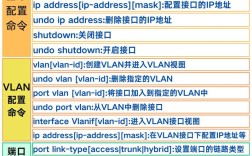
(图片来源网络,侵删)
进入全局配置模式
Switch> enable
Switch# configure terminal
Switch(config)#
设置设备主机名
! 将 "Switch-4500" 替换为您想要的名称
Switch(config)# hostname Switch-4500
Switch-4500(config)#
配置管理IP地址 这是为了能远程管理交换机(例如通过SSH或Telnet登录),管理VLAN通常是VLAN 1。
! 进入VLAN 1的接口配置模式
Switch-4500(config)# interface vlan 1
! 配置IP地址和子网掩码
Switch-4500(config-if)# ip address 192.168.1.254 255.255.255.0
! 激活该接口
Switch-4500(config-if)# no shutdown
! 返回全局配置模式
Switch-4500(config-if)# exit
设置默认网关

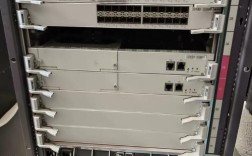
(图片来源网络,侵删)
! 如果需要跨网段管理,必须设置网关
Switch-4500(config)# ip default-gateway 192.168.1.1
配置登录密码
! 设置进入特权模式的密码
Switch-4500(config)# enable secret cisco
! 设置控制台登录密码
Switch-4500(config)# line console 0
Switch-4500(config-line)# password console_password
Switch-4500(config-line)# login
Switch-4500(config-line)# exit
! 设置VTY(虚拟终端,用于Telnet/SSH)登录密码
Switch-4500(config)# line vty 0 15
Switch-4500(config-line)# password vty_password
Switch-4500(config-line)# login
Switch-4500(config-line)# exit
启用SSH(推荐,不安全Telnet)
! 生成RSA密钥对(用于SSH加密)
Switch-4500(config)# crypto key generate rsa
! 设置用户名和密码
Switch-4500(config)# username admin secret admin_password
! 进入VTY线路配置模式
Switch-4500(config)# line vty 0 15
! 配置优先使用SSH,并允许本地用户登录
Switch-4500(config-line)# transport input ssh
Switch-4500(config-line)# login local
! 退出
Switch-4500(config-line)# exit
保存配置
Switch-4500# write memory
Building configuration...
[OK]
第二部分:VLAN配置
VLAN用于在物理网络上划分逻辑子网,增强安全性和隔离广播域。

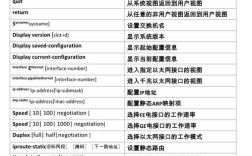
(图片来源网络,侵删)
创建VLAN
! 创建VLAN 10,并命名为 "Sales"
Switch-4500(config)# vlan 10
Switch-4500(config-vlan)# name Sales
! 创建VLAN 20,并命名为 "Engineering"
Switch-4500(config)# vlan 20
Switch-4500(config-vlan)# name Engineering
Switch-4500(config-vlan)# exit
将端口分配到VLAN
假设我们要将 Gi1/1 到 Gi1/5 划分到VLAN 10。
! 进入接口范围配置模式
Switch-4500(config)# interface range gigabitethernet 1/1 - 5
! 将端口设置为接入模式,并划入VLAN 10
Switch-4500(config-if-range)# switchport mode access
Switch-4500(config-if-range)# switchport access vlan 10
! 退出
Switch-4500(config-if-range)# exit
配置Trunk(中继)端口 Trunk端口用于在不同交换机之间或交换机与路由器之间传输多个VLAN的流量,通常连接到其他网络设备。
! 假设 Gi1/24 口要配置为Trunk,连接到另一台交换机
Switch-4500(config)# interface gigabitethernet 1/24
! 设置端口为Trunk模式
Switch-4500(config-if)# switchport mode trunk
! (可选)允许所有VLAN通过Trunk,或者指定允许的VLAN列表
! 允许所有VLAN
Switch-4500(config-if)# switchport trunk allowed vlan all
! 或者只允许VLAN 10, 20, 99通过
Switch-4500(config-if)# switchport trunk allowed vlan 10,20,99
! (可选)设置本端口的Native VLAN(即不带VLAN标签的流量所属的VLAN)
Switch-4500(config-if)# switchport trunk native vlan 99
! 退出
Switch-4500(config-if)# exit
第三部分:生成树协议配置
STP用于防止网络中出现物理环路导致的广播风暴,Catalyst 4500系列通常运行的是PVST+(每VLAN生成树)。
查看STP状态
Switch-4500# show spanning-tree
优化STP配置(可选)
! 进入全局配置模式
Switch-4500(config)# spanning-tree mode pvst
! 设置根桥(Root Bridge),优先级值越小,优先级越高。
! 将交换机设置为主根桥
Switch-4500(config)# spanning-tree vlan 10 root primary
! 或者设置为备份根桥
Switch-4500(config)# spanning-tree vlan 10 root secondary
! 设置端口快速启动(对于连接PC或服务器的端口,可以加速STP收敛)
Switch-4500(config)# interface range gigabitethernet 1/1 - 5
Switch-4500(config-if-range)# spanning-tree portfast
第四部分:三层路由配置
Catalyst 4500系列交换机(需要带有MSFC或Supervisor Engine 720等三层引擎)可以配置为三层交换机,实现VLAN间路由。
启用路由功能
! 在全局配置模式下,关闭接口交换功能,开启路由功能
Switch-4500(config)# interface vlan 10
Switch-4500(config-if)# no switchport
Switch-4500(config-if)# ip address 192.168.10.1 255.255.255.0
Switch-4500(config-if)# no shutdown
Switch-4500(config-if)# interface vlan 20
Switch-4500(config-if)# no switchport
Switch-4500(config-if)# ip address 192.168.20.1 255.255.255.0
Switch-4500(config-if)# no shutdown
配置静态路由 如果需要访问其他网络,需要配置静态路由。
! 格式: ip route <目标网络> <子网掩码> <下一跳地址>
! 示例:所有发往 10.0.0.0/8 网段的流量,下一跳是 192.168.1.1
Switch-4500(config)# ip route 10.0.0.0 255.0.0.0 192.168.1.1
第五部分:常用查看命令
- 查看当前运行的配置:
Switch# show running-config
- 查看启动配置:
Switch# show startup-config
- 查看接口状态和配置:
Switch# show interface gigabitethernet 1/1
- 查看VLAN信息:
Switch# show vlan brief
- 查看MAC地址表:
Switch# show mac-address-table
- 查看ARP表:
Switch# show arp
- 查看路由表:
Switch# show ip route
- 查看CPU和内存使用率:
Switch# show processes cpu
Switch# show memory statistics
第六部分:配置示例
以下是一个简单的综合配置示例,将上述命令组合起来:
! 1. 基础初始化
enable
configure terminal
hostname Office-Core-SW
! 2. 管理IP和网关
interface vlan 1
 ip address 10.1.1.1 255.255.255.0
 no shutdown
exit
ip default-gateway 10.1.1.254
! 3. 安全配置
enable secret cisco123
line console 0
 password console_pass
 login
line vty 0 15
 password telnet_pass
 login
exit
! 4. VLAN创建
vlan 10
 name Sales
vlan 20
 name Engineering
exit
! 5. 端口分配
interface range gigabitethernet 1/1 - 10
 switchport mode access
 switchport access vlan 10
 spanning-tree portfast
exit
interface range gigabitethernet 1/11 - 20
 switchport mode access
 switchport access vlan 20
 spanning-tree portfast
exit
! 6. Trunk配置
interface gigabitethernet 1/24
 switchport mode trunk
 switchport trunk allowed vlan 10,20,99
 switchport trunk native vlan 99
exit
! 7. 保存配置
end
write memory
免责声明: 以上命令为通用示例,在实际生产环境中,配置应根据具体网络拓扑、安全策略和业务需求进行调整,在进行配置前,请务必了解每条命令的作用,并在测试环境中充分验证。