要将DedeCMS(织梦内容管理系统)改为伪静态,需要通过修改配置文件、设置服务器规则以及调整系统参数来实现,伪静态能够提升网站SEO效果,优化用户体验,同时保持动态页面的灵活性,以下是详细步骤和注意事项:

伪静态的基本原理
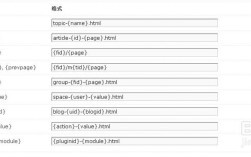
伪静态是通过服务器规则将动态URL(如index.php?m=list&c=index&a=show&catid=1&id=2)转换为静态化的形式(如/category/1/2.html),用户访问时看到的是静态URL,但实际内容仍由动态脚本生成,这需要服务器支持URL重写功能,常见工具包括Apache的.htaccess、Nginx的rewrite规则等。
准备工作
-
服务器环境确认
- Apache:需启用
mod_rewrite模块(通过phpinfo()检查)。 - Nginx:需支持
rewrite模块,并配置相应的规则文件。 - 虚拟主机:部分虚拟主机已内置伪静态支持,需联系服务商确认。
- Apache:需启用
-
DedeCMS版本兼容性
不同版本的DedeCMS伪静态配置可能存在差异,本文以V5.7 SP2为例,其他版本可参考类似步骤。
 (图片来源网络,侵删)
 -
备份文件
修改前需备份以下文件:- 根目录下的
index.php、htaccess.txt(或.htaccess) /include/config_base.php、/include/config_update.php- 后台目录的
config.php(如/dede/config.php)
- 根目录下的
修改DedeCMS配置文件
-
开启伪静态功能
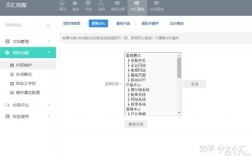
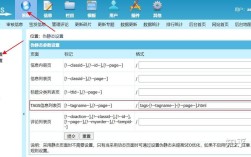
登录DedeCMS后台,进入【系统】→【系统基本参数】→【核心设置】,找到“是否使用伪静态”选项,选择“是”,保存后系统会自动生成htaccess.txt文件(若无则手动创建)。 -
修改
config_update.php
编辑/include/config_update.php,找到以下代码并修改:$cfg_rewrite = 'Y'; // 将'N'改为'Y'
-
修改
config_base.php
编辑/include/config_base.php,确保$cfg_rewrite为'Y':$cfg_rewrite = 'Y';
配置服务器伪静态规则
Apache环境
- 将
htaccess.txt重命名为.htaccess,并上传到网站根目录。 - 若无
htaccess.txt,手动创建.htaccess如下:RewriteEngine On RewriteRule ^index\.html$ index\.php [L] RewriteRule ^category/([0-9]+)/$ index\.php\?m=list&c=index&catid=$1 [L] RewriteRule ^category/([0-9]+)/([0-9]+)/$ index\.php\?m=list&c=index&catid=$1&page=$2 [L] RewriteRule ^archives/([0-9]+)/$ index\.php\?m=content&c=index&a=view&catid=$1&id=$2 [L] RewriteRule ^archives/([0-9]+)/([0-9]+)/$ index\.php\?m=content&c=index&a=view&catid=$1&id=$2&page=$3 [L] RewriteRule ^list/([0-9]+)/$ index\.php\?m=list&c=index&catid=$1 [L] RewriteRule ^list/([0-9]+)/([0-9]+)/$ index\.php\?m=list&c=index&catid=$1&page=$2 [L] RewriteRule ^view/([0-9]+)/([0-9]+)/$ index\.php\?m=content&c=index&a=view&catid=$1&id=$2 [L] RewriteRule ^view/([0-9]+)/([0-9]+)/([0-9]+)/$ index\.php\?m=content&c=index&a=view&catid=$1&id=$2&page=$3 [L]
Nginx环境
- 编辑Nginx配置文件(通常为
nginx.conf或站点配置文件),在server段中添加以下规则:rewrite "^/index\.html$" /index.php last; rewrite "^/category/([0-9]+)/$" /index.php?m=list&c=index&catid=$1 last; rewrite "^/category/([0-9]+)/([0-9]+)/$" /index.php?m=list&c=index&catid=$1&page=$2 last; rewrite "^/archives/([0-9]+)/([0-9]+)/$" /index.php?m=content&c=index&a=view&catid=$1&id=$2 last; rewrite "^/archives/([0-9]+)/([0-9]+)/([0-9]+)/$" /index.php?m=content&c=index&a=view&catid=$1&id=$2&page=$3 last; rewrite "^/list/([0-9]+)/$" /index.php?m=list&c=index&catid=$1 last; rewrite "^/list/([0-9]+)/([0-9]+)/$" /index.php?m=list&c=index&catid=$1&page=$2 last; rewrite "^/view/([0-9]+)/([0-9]+)/$" /index.php?m=content&c=index&a=view&catid=$1&id=$2 last; rewrite "^/view/([0-9]+)/([0-9]+)/([0-9]+)/$" /index.php?m=content&c=index&a=view&catid=$1&id=$2&page=$3 last;
- 修改后需重启Nginx服务(
nginx -s reload)。
验证伪静态是否生效
-
生成测试URL
在后台发布一篇测试文章,确认文章URL是否已转换为静态形式(如/archives/1/2.html)。 -
检查服务器日志
通过服务器错误日志或访问日志,查看是否正确匹配重写规则。 -
使用工具检测
通过SEO工具(如站长之家)检测URL是否为静态形式。
常见问题解决
-
404错误
- 检查
.htaccess或Nginx规则是否正确上传。 - 确认服务器是否支持伪静态模块。
- 尝试清空浏览器缓存或使用无痕模式访问。
- 检查
-
首页无法访问
- 检查
index.php是否存在且可执行。 - 确认
RewriteEngine On是否启用。
- 检查
-
分页URL无效
- 检查规则中是否包含分页参数(如
page=$2)。 - 重新生成全站HTML缓存。
- 检查规则中是否包含分页参数(如
伪静态规则说明
以下为常用伪静态规则对应的动态URL对照表:
| 静态URL | 动态URL |
|---|---|
/category/1/ |
index.php?m=list&c=index&catid=1 |
/category/1/2/ |
index.php?m=list&c=index&catid=1&page=2 |
/archives/1/2/ |
index.php?m=content&c=index&a=view&catid=1&id=2 |
/archives/1/2/3/ |
index.php?m=content&c=index&a=view&catid=1&id=2&page=3 |
注意事项
-
URL冲突
避免伪静态规则与实际静态文件路径冲突,例如已存在/category/1.html时,规则中应避免重复路径。 -
性能优化
伪静态可能增加服务器负担,建议启用缓存插件(如DedeCMS自带的HTML缓存)。 -
插件兼容性
部分插件可能不支持伪静态,需测试功能是否正常。
相关问答FAQs
问题1:修改伪静态后,后台登录页面无法访问怎么办?
解答:通常是因为伪静态规则覆盖了/dede/目录,需在.htaccess或Nginx规则中添加例外,
- Apache:
RewriteRule ^dede/ - [L] - Nginx:
rewrite "^/dede/" last;
重启服务器后即可正常访问后台。
问题2:伪静态设置成功,但新发布的文章仍显示动态URL?
解答:可能是缓存未更新,进入DedeCMS后台【系统】→【更新缓存】,全选并更新,若仍无效,检查【系统】→【系统基本参数】→“核心设置”中的“文章命名规则”是否已调整为静态格式(如{typedir}/{aid}.html),并重新生成文章HTML。