ECSHOP作为国内广泛使用的开源电商系统,其默认的URL动态链接不利于SEO优化和用户体验,而开启伪静态可以将动态URL转换为静态化的形式,提升搜索引擎友好度和页面加载速度,以下是ECSHOP开启伪静态的详细步骤及注意事项,涵盖不同服务器环境的配置方法。

伪静态的作用与准备工作
在开启伪静态前,需明确其核心优势:一是隐藏动态参数(如?id=1&cat=2),使URL更简洁美观;二是减少搜索引擎对动态页面的抓取顾虑,提高页面权重;三是可能通过缓存机制降低服务器负载,准备工作包括:
- 确认服务器环境:ECSHOP伪静态支持Apache、Nginx、IIS等服务器,但配置规则差异较大,需先明确当前环境(可通过phpinfo()或服务器管理面板查看)。
- 备份文件与数据库:配置前务必备份ECSHOP程序文件(尤其是
.htaccess、httpd.conf等配置文件)和数据库,避免配置错误导致网站无法访问。 - 检查伪静态模块:Apache需开启
mod_rewrite模块(通过phpinfo()查看“Loaded Modules”中是否存在);Nginx默认支持伪静态,但需确认配置文件是否正确引用规则;IIS需安装“URL Rewrite”模块。
Apache环境下开启伪静态
Apache是最常见的ECSHOP运行环境,其伪静态主要通过.htaccess文件实现,步骤如下:
修改ECSHOP后台设置
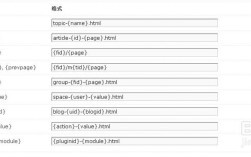
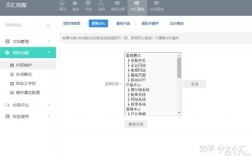
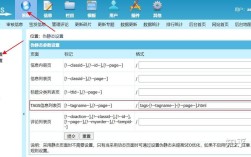
登录ECSHOP后台,进入【商店设置】→【基本设置】,将“URL格式”选项从“动态”改为“静态”,保存后系统会自动在根目录生成.htaccess文件(若未生成,可手动创建)。
配置.htaccess文件
打开ECSHOP根目录下的.htaccess文件,确保以下代码存在(不同ECSHOP版本可能略有差异,以官方最新版本为准):

RewriteEngine On
RewriteBase /
RewriteRule ^index\.html$ index.php [L]
RewriteRule ^category-([0-9]+)\.html$ category\.php?id=$1 [L]
RewriteRule ^goods-([0-9]+)\.html$ goods\.php?id=$1 [L]
RewriteRule ^article_cat-([0-9]+)\.html$ article_cat\.php?id=$1 [L]
RewriteRule ^article-([0-9]+)\.html$ article\.php?id=$1 [L]
RewriteRule ^brand-([0-9]+)\.html$ brand\.php?id=$1 [L]
RewriteRule ^search\.html$ search\.php [L]
RewriteRule ^my_cart\.html$ my_cart\.php [L]
RewriteRule ^my_order\.html$ my_order\.php [L]
RewriteRule ^user\.html$ user\.php [L]
RewriteRule ^collect\.html$ collect\.php [L]
RewriteRule ^comment\.html$ comment\.php [L]
RewriteRule ^tag-(.*)\.html$ tag\.php?name=$1 [L]
注意:
RewriteBase /需根据网站安装目录调整,若安装在子目录(如/shop),则需改为RewriteBase /shop/。- 部分服务器可能需要关闭
AllowOverride None(在httpd.conf中查找对应虚拟主机配置,修改为AllowOverride All),否则.htaccess规则可能不生效。
重启Apache服务
配置完成后,登录服务器执行service httpd restart(Linux系统)或通过服务器管理面板重启,使配置生效,访问网站任意页面,查看URL是否已静态化(如商品页从goods.php?id=123变为goods-123.html)。
Nginx环境下开启伪静态
Nginx环境下伪静态规则需添加到虚拟主机配置文件中,步骤如下:
修改ECSHOP后台设置
与Apache环境一致,先在后台将“URL格式”设置为“静态”。
配置Nginx虚拟主机文件
打开Nginx虚拟主机配置文件(通常位于/usr/local/nginx/conf/vhost/域名.conf),在server块中添加以下伪静态规则:
rewrite ^/index\.html$ /index.php last;
rewrite ^/category-([0-9]+)\.html$ /category\.php?id=$1 last;
rewrite ^/goods-([0-9]+)\.html$ /goods\.php?id=$1 last;
rewrite ^/article_cat-([0-9]+)\.html$ /article_cat\.php?id=$1 last;
rewrite ^/article-([0-9]+)\.html$ /article\.php?id=$1 last;
rewrite ^/brand-([0-9]+)\.html$ /brand\.php?id=$1 last;
rewrite ^/search\.html$ /search\.php last;
rewrite ^/my_cart\.html$ /my_cart\.php last;
rewrite ^/my_order\.html$ /my_order\.php last;
rewrite ^/user\.html$ /user\.php last;
rewrite ^/collect\.html$ /collect\.php last;
rewrite ^/comment\.html$ /comment\.php last;
rewrite ^/tag-(.*)\.html$ /tag\.php?name=$1 last;
注意:
- 若ECSHOP安装在子目录,需在规则前添加子目录路径(如
rewrite ^/shop/category-([0-9]+)\.html$ /shop/category\.php?id=$1 last;)。 - 规则需放在
location / { ... }块内,且确保last标志正确使用(避免无限循环)。
重启Nginx服务
执行nginx -s reload或service nginx restart重启Nginx,使配置生效,检查网站URL是否静态化,若404错误需检查规则语法或路径是否正确。
IIS环境下开启伪静态
IIS服务器需通过“URL Rewrite”模块实现伪静态,步骤如下:
安装URL Rewrite模块
若未安装模块,需先下载Microsoft URL Rewrite Module(适用于IIS7及以上版本),通过服务器管理器“添加角色和功能”安装。
配置伪静态规则
- 方法1:通过web.config文件
在ECSHOP根目录创建web.config文件,添加以下内容:<?xml version="1.0" encoding="UTF-8"?> <configuration> <system.webServer> <rewrite> <rules> <rule name="ECSHOP Rule 1"> <match url="^index\.html$" /> <action type="Rewrite" url="index.php" /> </rule> <rule name="ECSHOP Rule 2"> <match url="^category-([0-9]+)\.html$" /> <action type="Rewrite" url="category.php?id={R:1}" /> </rule> <rule name="ECSHOP Rule 3"> <match url="^goods-([0-9]+)\.html$" /> <action type="Rewrite" url="goods.php?id={R:1}" /> </rule> <!-- 其他规则参考Apache规则,将$改为{R:1}等引用格式 --> </rules> </rewrite> </system.webServer> </configuration> - 方法2:通过IIS管理器配置
打开IIS管理器,选择对应网站,双击“URL Rewrite”,点击“导入规则”,选择ECSHOP提供的规则文件(若有),或手动添加上述规则。
重启IIS服务
执行iisreset或通过IIS管理器重启网站,检查URL是否静态化,若出现404,需确认模块安装是否正常及规则语法是否正确。
伪静态常见问题与解决方法
| 问题现象 | 可能原因 | 解决方案 |
|---|---|---|
| 伪静态配置后网站无法访问 | .htaccess/web.config语法错误; Rewrite模块未开启; 路径配置错误 |
检查配置文件语法(Apache用htaccess -t检查);确认服务器模块状态; 核对RewriteBase/安装目录路径 |
| 部分页面仍为动态URL | 后台URL格式未修改; 规则未覆盖所有页面 |
进入后台重新设置“URL格式”为静态; 补充缺失的伪静态规则(如品牌页、搜索页等) |
| 点击伪静态链接404 | 服务器未重启; 规则优先级冲突 |
重启服务器/网站服务; 调整rewrite规则顺序,将精确匹配规则放在前面 |
相关问答FAQs
Q1:开启伪静态后,网站后台无法登录怎么办?
A:通常是因为伪静态规则误拦截了后台登录页面,解决方法:在.htaccess或Nginx配置文件中添加后台路径排除规则,例如Apache环境下可在RewriteEngine On后添加RewriteRule ^admin/.* - [L],跳过admin目录下的伪静态处理;Nginx环境下可在server块中添加location /admin/ { rewrite ^ /admin/ last; },避免后台页面被重写。
Q2:ECSHOP伪静态后,商品分类页点击“下一页”URL不正确如何解决?
A:这是因为分页页面的伪静态规则未定义,需在配置文件中添加分页规则,例如Apache环境下添加RewriteRule ^category-([0-9]+)-([0-9]+)\.html$ category\.php?id=$1&page=$2 [L],Nginx环境下添加rewrite ^/category-([0-9]+)-([0-9]+)\.html$ /category\.php?id=$1&page=$2 last;,即可实现分类分页静态化(如category-1-2.html)。
通过以上步骤,即可根据不同服务器环境完成ECSHOP伪静态配置,配置后建议使用百度搜索资源平台或Google Search Console提交sitemap,以便搜索引擎更快抓取静态页面,提升网站SEO效果。