chkconfig 已被弃用
chkconfig 是一个用于管理系统服务的经典工具,它主要用于在 Red Hat Enterprise Linux (RHEL) 5、6 以及基于它们的发行版(如 CentOS 6、Scientific Linux 6)中。

从 RHEL/CentOS 7 开始,系统逐渐迁移到了 systemd 作为初始化系统(init system),并且推荐使用新的命令来管理服务。systemd 引入了自己的一套管理工具,其中最核心的就是 systemctl。
当你在 CentOS 7、RHEL 7、Ubuntu 16.04 及更高版本上运行 chkconfig 时,系统会提示“command not found”,因为这个命令包默认没有被安装。
解决方案
根据你使用的 Linux 发行版和你的需求,有以下几种解决方案。
安装 chkconfig 兼容包(推荐,如果习惯旧命令)
如果你是从旧的系统迁移过来的,或者团队脚本仍在使用 chkconfig,你可以安装一个兼容包来让它重新工作。

对于 CentOS / RHEL / Fedora / Rocky Linux / AlmaLinux 系统:
这些系统提供了 chkconfig 命令的兼容层,它实际上是一个指向 systemctl 的包装器。
-
安装
initscripts包: 这个包包含了chkconfig命令。sudo yum install initscripts
或者,如果你的系统使用
dnf(CentOS 8+ 及 Fedora):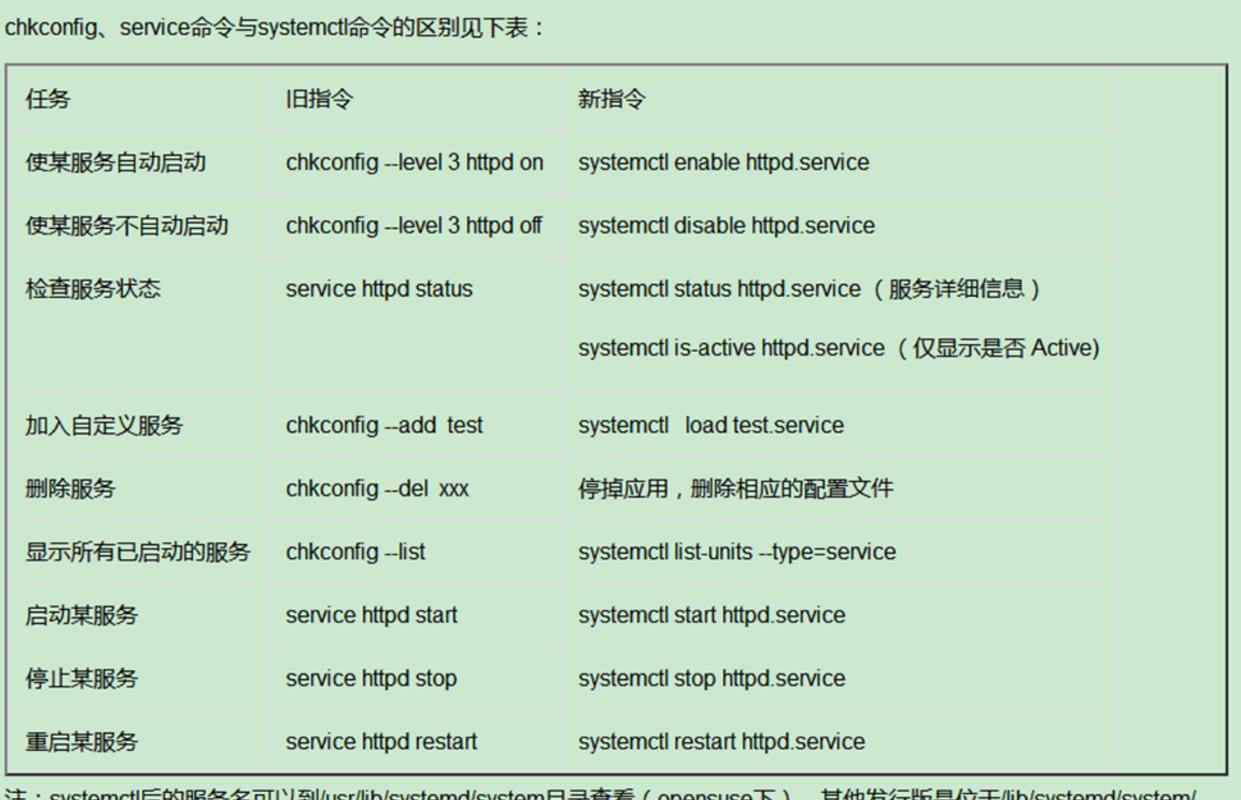 (图片来源网络,侵删)
sudo dnf install initscripts
-
验证安装: 安装完成后,再次尝试运行
chkconfig,它应该就能工作了。
对于 Ubuntu / Debian 系统:
在 Ubuntu/Debian 上,情况略有不同。chkconfig 命令通常存在于 sysvinit-utils 包中。
- 安装
sysvinit-utils包:sudo apt update sudo apt install sysvinit-utils
注意:在
systemd为主流的系统上强行安装chkconfig可能会引起一些混淆,因为它和systemctl的行为并非 100% 兼容,对于新项目,强烈建议直接学习使用systemctl。
学习并使用 systemctl(强烈推荐,现代标准)
这是目前最正确、最主流的解决方案,你应该将所有服务管理操作都切换到 systemctl。
systemctl 的功能比 chkconfig 更强大,并且与 systemd 深度集成。
常用命令对比:
| 功能 | chkconfig 命令 |
systemctl 命令 |
|---|---|---|
| 查看所有服务状态 | chkconfig --list |
systemctl list-unit-files --type=service |
| 查看特定服务状态 | chkconfig --list nginx |
systemctl status nginx.service |
| 启用服务开机自启 | sudo chkconfig nginx on |
sudo systemctl enable nginx.service |
| 禁用服务开机自启 | sudo chkconfig nginx off |
sudo systemctl disable nginx.service |
| 立即启动服务 | sudo service nginx start¹ |
sudo systemctl start nginx.service |
| 立即停止服务 | sudo service nginx stop¹ |
sudo systemctl stop nginx.service |
| 重启服务 | sudo service nginx restart¹ |
sudo systemctl restart nginx.service |
| 重新加载服务 | sudo service nginx reload¹ |
sudo systemctl reload nginx.service |
¹ service 命令在很多现代系统上仍然可用,它通常也是 systemctl 的一个前端。
示例:
假设你要管理一个名为 mymysql 的服务。
-
查看服务是否开机自启:
# chkconfig 方式 (如果已安装)
chkconfig --list mymysql
# systemctl 方式
systemctl is-enabled mymysql.service
# 输出可能是: enabled, disabled, static
-
设置服务开机自启:
# chkconfig 方式
sudo chkconfig mymysql on
# systemctl 方式
sudo systemctl enable mymysql.service
# Created symlink /etc/systemd/system/multi-user.target.wants/mymysql.service → /usr/lib/systemd/system/mymysql.service.
这会创建一个符号链接,确保系统启动时自动启动该服务。
-
取消服务开机自启:
# chkconfig 方式
sudo chkconfig mymysql off
# systemctl 方式
sudo systemctl disable mymysql.service
# Removed /etc/systemd/system/multi-user.target.wants/mymysql.service.
这会删除上面创建的符号链接。
-
立即启动并检查状态:
sudo systemctl start mymysql.service
systemctl status mymysql.service
使用 service 命令(过渡方案)
service 命令是一个更通用的命令,用于控制正在运行的服务,它在旧的 SysVinit 和新的 systemd 系统上都能工作,并且在很多情况下,它会自动调用正确的底层工具(systemctl)。
# 启动服务
sudo service nginx start
# 停止服务
sudo service nginx stop
# 重启服务
sudo service nginx restart
# 查看服务状态
sudo service nginx status
虽然 service 命令可以控制服务的运行状态,但它不能设置服务的开机自启,对于开机自启,你仍然需要 systemctl enable 或 chkconfig on。
总结与建议
| 方案 | 优点 | 缺点 | 适用场景 |
|---|---|---|---|
安装 chkconfig |
保持旧有脚本和习惯不变 | 不符合现代系统标准,可能引起混淆;在 Debian/Ubuntu 上行为不完全一致 | 维护老旧脚本或从旧系统迁移过渡 |
使用 systemctl |
行业标准,功能强大,与系统深度融合 | 需要学习新的命令语法 | 所有新项目和现代系统的推荐选择 |
使用 service |
命令简单,兼容性好 | 无法管理开机自启 | 快速启动、停止、查看服务状态的日常操作 |
最终建议:
- 对于新服务器和新项目:请直接拥抱
systemctl,这是未来的方向。 - 如果只是临时遇到这个问题:快速判断你的系统版本,然后选择安装
initscripts(CentOS/RHEL)或sysvinit-utils(Ubuntu/Debian)来解决燃眉之急。 - 长期来看:花一点时间学习
systemctl,它会让你的 Linux 管理工作更加高效和规范。