核心查看命令(最常用)
这些是日常排错和监控时最频繁使用的命令。
(图片来源网络,侵删)
show interfaces
这是查看接口信息最基本、最重要的命令,不带任何参数时,它会显示所有接口的摘要信息。
Router# show interfaces
输出解读:
V1 is up, line protocol is up:接口和线路协议都正常,可以收发数据。V1 is administratively down, line protocol is down:接口被管理员手动关闭了(使用shutdown命令)。V1 is up, line protocol is down:物理链路正常(如光纤、网线插好了),但线路协议有问题,常见原因有:- 两端速率/双工模式不匹配
- VLAN 不匹配
- 封装类型不一致
- 物理层问题(如光衰、CRC错误过高)
show interfaces [interface-id]
查看特定接口的详细信息,这是排错时最关键的命令。
# 查看名为 GigabitEthernet0/1 的接口详细信息
Router# show interfaces GigabitEthernet0/1
输出解读(重点关注):
(图片来源网络,侵删)
-
第一部分 - 状态和封装信息:
Hardware is Gigabit Ethernet...:硬件类型。MTU 1500 bytes...:最大传输单元。BW 1000000 Kbit...:带宽(1Gbps)。DLY 10 usec...:延迟。reliability 255/255...:可靠性。txload 1/255, rxload 1/255:当前流量负载(1/255表示非常低)。Encapsulation ARPA:二层封装类型(以太网默认为 ARPA)。Keepalive set (10 sec):保持计时器。
-
第二部分 - 协议和地址信息:
Internet address is 192.168.1.1/24:三层IP地址和子网掩码。Broadcast address is 255.255.255.255:广播地址。
-
第三部分 - 重要的计数器(排错关键):
...received 0 broadcasts, 0 runts, 0 giants...runts:小于最小以太网帧(64字节)的数据包,通常由冲突或错误引起。giants:大于最大以太网帧(1518字节)的数据包。
0 input errors, 0 CRC, 0 frame, 0 overrun, 0 ignored:CRC:循环冗余校验错误,通常表明物理层问题(线缆、光模块、端口故障)。frame:帧校验序列错误,通常也指向物理层问题。overrun:接收速率超过CPU处理能力,导致数据包丢失。
0 output errors, 0 collisions, 1 interface resets:collisions:冲突(半双工模式下常见)。interface resets:接口被重置,可能不稳定。
show ip interface brief
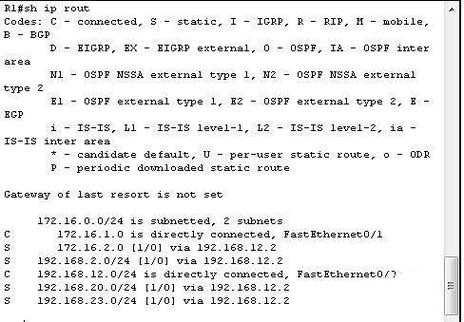
以简洁的表格形式显示所有三层接口的IP地址和状态,这是最快查看所有接口运行状态的命令。
(图片来源网络,侵删)
Router# show ip interface brief
输出解读:
Interface              IP-Address      OK? Method Status                Protocol
GigabitEthernet0/0    192.168.1.1     YES manual up                    up
GigabitEthernet0/1    unassigned      YES unset  administratively down down
Vlan1 unassigned YES unset up upStatus:对应show interfaces里的is up/down。Protocol:对应show interfaces里的line protocol is up/down。
查看接口配置
show running-config interface [interface-id]
查看指定接口的当前运行配置,这对于确认接口的配置(如IP地址、VLAN、描述等)非常有用。
# 查看G0/1接口的详细配置
Router# show running-config interface GigabitEthernet0/1
输出解读:
interface GigabitEthernet0/1
 description --- Link to Server Room Switch ---
 ip address 192.168.1.2 255.255.255.0
 duplex auto
 speed auto
 no cdp enable
description:接口的描述信息,强烈建议配置,方便管理。ip address:配置的IP地址和子网掩码。duplex auto/speed auto:双工和速率设置为自动协商。no cdp enable:禁用思科发现协议。
show interfaces [interface-id] switchport
对于交换机,这个命令用于查看二层交换端口(VLAN接口)的详细配置。
Switch# show interfaces GigabitEthernet0/1 switchport
输出解读:
Administrative Mode: dynamic auto:管理模式的协商策略(access,trunk,dynamic auto,dynamic desirable)。Operational Mode: static access:当前协商后的实际模式。Access Mode VLAN: 10:如果模式是access,则显示其所属的VLAN。Trunking Mode: off:如果模式是trunk,会显示允许通过的VLAN列表。
高级和排错命令
show interfaces [interface-id] status
提供一个非常简洁的接口状态列表,常用于快速检查物理连接和VLAN分配。
Switch# show interfaces status
输出解读:
Port      Name               Status       Vlan       Duplex  Speed Type
Gi0/1     --- Link to R1     connected    10         auto    auto  10/100/1000BaseTX
Gi0/2 --- Link to PC notconnect 1 auto auto 10/100/1000BaseTXconnected:物理链路已连接。notconnect:物理链路未连接。suspended:由于安全策略(如Port Security)而被挂起。
show interfaces [interface-id] description
只查看所有(或指定)接口的名称和描述信息。
Switch# show interfaces description
show interfaces [interface-id] counters errors
专门查看接口的错误计数器,比 show interfaces 更聚焦于错误信息。
show controllers [interface-id]
这是一个非常底层的命令,主要用于检查物理层信号,特别是对于 T1/E1、串口 或 POS 等广域网接口,对于以太网口,它显示的是硬件相关信息,如背板信息。
配置接口(用于对比)
为了更好地理解,这里附上配置接口的基本命令,方便查看配置后与 show 命令的结果进行对比。
# 进入接口配置模式
Router(config)# interface GigabitEthernet0/1
# 给接口分配IP地址
Router(config-if)# ip address 192.168.1.1 255.255.255.0
# 启用接口(默认是开启的,但被关闭后需要此命令)
Router(config-if)# no shutdown
# 添加描述
Router(config-if)# description Core Uplink to Building-A
# 设置双工和速率(不推荐手动设置,除非有特殊要求)
Router(config-if)# duplex full
Router(config-if)# speed 100
| 命令 | 用途 | 输出示例 |
|---|---|---|
show interfaces |
查看所有接口的摘要状态 | GigabitEthernet0/0 is up, line protocol is up |
show interfaces g0/1 |
查看特定接口的详细信息(状态、计数器、错误) | CRC 0, input errors 0, output errors 0 |
show ip interface brief |
快速查看所有三层接口的IP和状态(表格形式) | GigabitEthernet0/0 YES manual up up |
show running-config int g0/1 |
查看指定接口的当前配置 | ip address 192.168.1.1 255.255.255.0 |
show interfaces g0/1 switchport |
交换机查看二层VLAN配置 | Administrative Mode: dynamic auto |
show interfaces status |
交换机快速查看物理连接和VLAN状态 | connected, notconnect |
排错思路:
- 先用
show ip interface brief快速定位哪个接口有问题。 - 再用
show interfaces [problematic-interface]查看详细信息,重点看line protocol状态和错误计数器(CRC, frame, overrun)。 - 用
show running-config interface [problematic-interface]检查配置是否正确。 - 如果是交换机,配合
show interfaces switchport和show interfaces status进行排查。